
Manually enable/disable the Gateway Server
Overview Based on your farm configuration, the Farm Controller will automatically change its own Web Portal settings to become a Gateway Server, allowing users connecting from the TSplus Web Portal of the Farm Controller, not to connect directly to the Farm Controller itself, but to one of the application server of the Farm. However, if…
Overview
Based on your farm configuration, the Farm Controller will automatically change its own Web Portal settings to become a Gateway Server, allowing users connecting from the TSplus Web Portal of the Farm Controller, not to connect directly to the Farm Controller itself, but to one of the application server of the Farm.
However, if you want to manually change this behaviour, you can do so by clicking on the “WEB” tile, then on the Web Portal Preferences button.
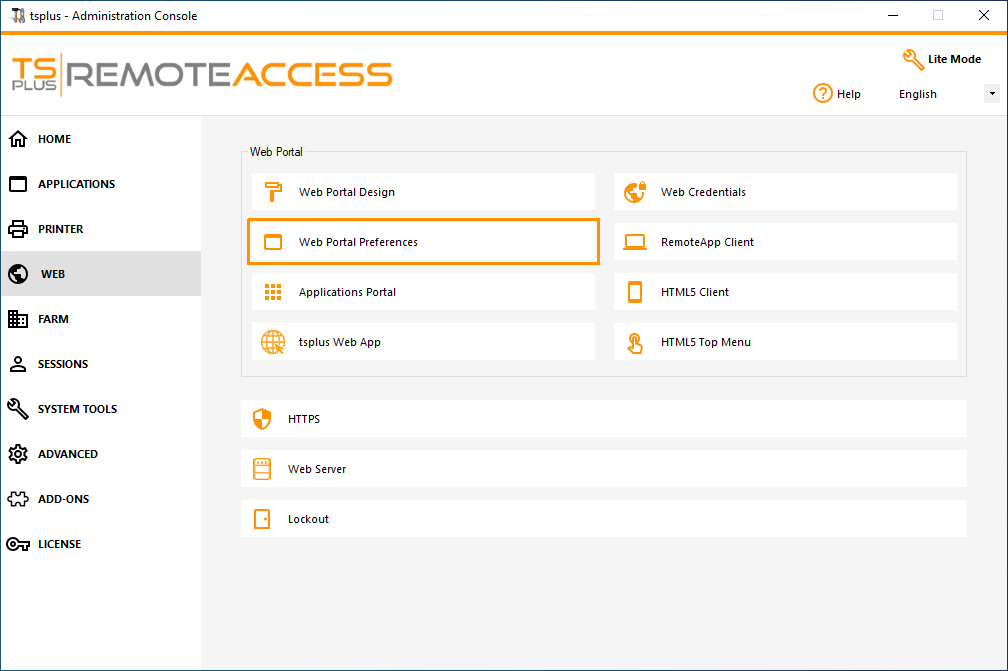
- Check the “Generate a Gateway Portal enabled Web Page” box if you want the Gateway Portal of the Farm Controller (the current server you are configuring now) to become a Gateway Server and redirect users to application servers of the farm.
- Uncheck the “Generate a Gateway Portal enabled Web Page” box if you want the Gateway Portal of the Farm Controller to redirect to the Farm Controller itself, thus bypassing any farm configuration.
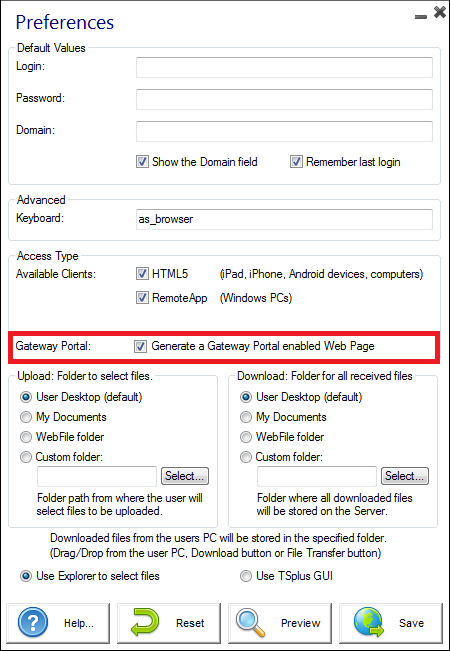
Click on “Save” to save this setting.
Need help with this topic?
The TSplus Türkiye team can help you validate the configuration before production rollout.